Friday, September 07, 2007

Drawings Ahoy!


I don't remember this man's name but when I was at my Grandma's place, she was watching a show where an evangelist minister answered questions that people mailed in. He had an interesting face...


This may look like DQ but it actually was a stern looking man drawing the model at the life drawing place I went to from time to time over the summer. He actually looked more like George Lucas than anything...


Some guy that looked kind of goofy while drawing at life drawing. Took the opportunity rip him to shreds! He was more interesting to draw then the actual model!


Trevor Spencer resembling a Mandrill. :P


My buddy Steve from work!


A Life drawing from the summer.

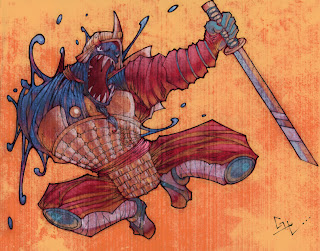
SAMURAI!!!

Friday, August 17, 2007

Photoshop Painting


Well school's creeping back on us. Somewhere in between work and the excessive amounts of video game playing this summer I managed to do SOME art. I

Tuesday, June 19, 2007

Hooray for Summer Time!!!


And for giant bugs and fish people!!!

Wednesday, May 30, 2007

Medusa


Obviously inspired by the oh so great Frank Frazetta.
Credit goes to my brother for coming up with the blind fold idea. Originally he was going to be staring straight into her glare and turning into stone.

Tuesday, May 22, 2007

Friday, April 27, 2007

Textures!!!

Hey guys, A lot of people ask me about how I get textures in my digital paintings so I've decided to show you how.

Now there are different ways to do it. You can either get the effect through using different brushes in Photoshop on different opacities or different flow. OR you can use a single image of a texture and put it on a layer over top of your image and change the type of layer it is. You can either make your own textures using paint or scan the bottoms of your old rusty pots and pans or you can just download them. It all depends on the look you're going for. Two GREAT places I know of online to find them are:


  • Mayang


  • CGTextures

  • For those of you who do not know how to get access to the different kinds of brushes in Photoshop, I will show you.
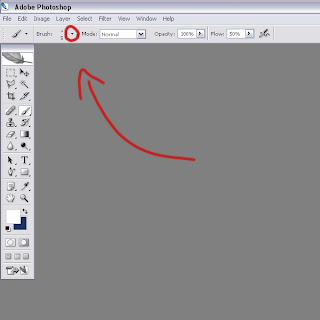

    First select your brush. Than click on the little tab next to where you can adjust the diameter of your brush.
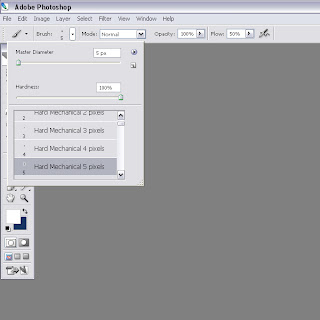

    It should open up a little menu like this showing the different brushes you can select.
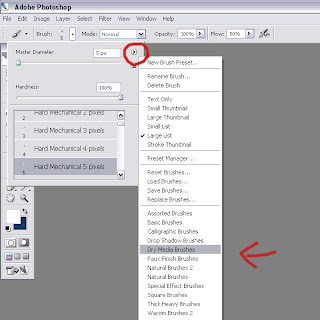

    Click on the little tab on the side, than another menu pops up and at the bottom of the menu are the various kinds of brushes you can select.
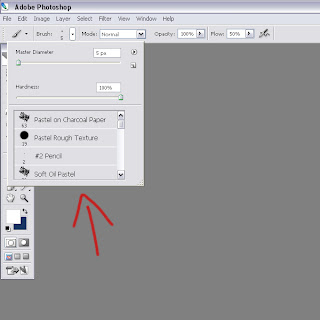

    After clicking on your desired selection, (for example I have chosen "Dry Media Brushes") you should be able to choose from the brushes of that specific category.

    I'll show you how I usually put just one texture over top of the entire image. I use the layer type of the layer with the texture on it to get my desired effect.
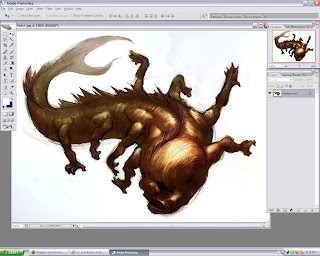


    First I take my image. (I used mostly brushes from the "Dry Media Brushes" selection to colour this one by the way :D )
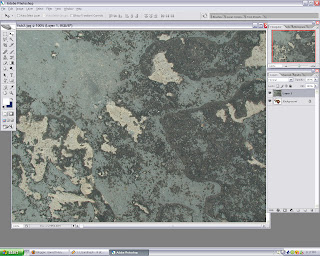

    Than I take the texture (This one's from Mayang.com) and copy and paste it on to a layer on top of the image.
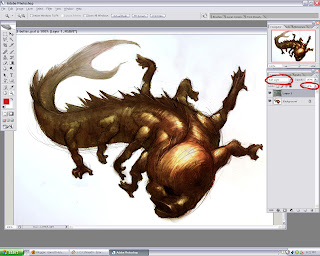

    Than I set the layer to whatever works best with what you want to do. In this case I used "Soft Light" and I felt it was a bit strong so I lowered the "fill" of the layer. Also if you don't want the texture in certain areas, adjust the opacity of your eraser and go in and take out what you don't need.

    Well there you go guys, hope it helps!


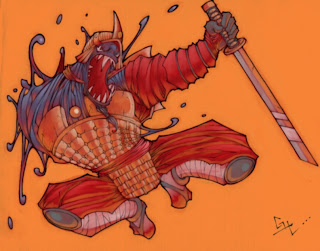
    EDIT: Here's an old one from high school. It's a clearer example of the effects the texturing does.
    Monday, April 23, 2007

    Sunday, April 22, 2007

    Finished my Second Year!!!


    Hey everyone!!! it's been a good year and I feel I've been somewhat productive and that it didn't necessarily go to waste. Hopefully the rest of you feel the same!!!

    I wish all of you a great summer!!!

    Tuesday, April 17, 2007

    Digital Paintings


    This is my interior background and my animation background for digital painting class.

    Wednesday, April 11, 2007

    Sunday, April 08, 2007

    Happy Easter!


    Now if we died with Christ, we believe that we will also live with him. For we know that since Christ was raised from the dead, he cannot die again; death no longer has mastery over him. The death he died, he died to sin once for all; but the life he lives, he lives to God. In the same way, count yourselves dead to sin but alive to God in Christ Jesus.

    Romans 6:8-11 (NIV)

    He is risen!!!

    Saturday, April 07, 2007

    The Great Big C


    This is my room mate Chris. We had a caricature war and this was the result. Not nearly as offensive as it should/could have been.. I'm too nice! He got some really good ones of me though, go check them out!

    Tuesday, March 20, 2007

    A few Oldies


    The top 2 I revamped in Photoshop.

    Sunday, March 04, 2007

    A Talking Monkey and a Date Gone Horribly Wrong...

    The synching is off with my muzzle character due to the way Youtube uploads your files.


    Wednesday, February 28, 2007

    Chun-Li


    Hey guys, this is a picture I did for my buddy as thanks for helping me out with all my computer troubles. Thanks Ian!!!

    Saturday, February 17, 2007

    Painter


    Hey y'all! This started out as a speed paint to get use to Painter and wasn't suppose to take more than an hour but one thing led to the next and well... You know how it is when you get carried away. I'm getting more and more use to painter now but I still prefer using Photoshop or Open Canvas. The Painter interface isn't as user-friendly as Photoshop's.

    Monday, February 12, 2007

    Some Stuff

    Hey, it's been awhile since I last posted something so I decided to dig up some stuff to scan.


    These are some marker sketches I did. I enjoyed doing these and when I have more spare time, I'd love to try and do some more and get better at it.


    This is a bunch of tiny sketches I did while cafe drawing with Trevor. Most of these were inspired by the people at the food court. This was fun to do. It was kind of like an exercise to push yourself to use different shapes for different character types.


    this is a mixed media piece I did over the break. It's a mix of oil-pitt based pencil, water colour, marker and white conte.